NoCrop Edit Picture, Whitagram4.0.0
Continue to app
Free Version
Publisher Description
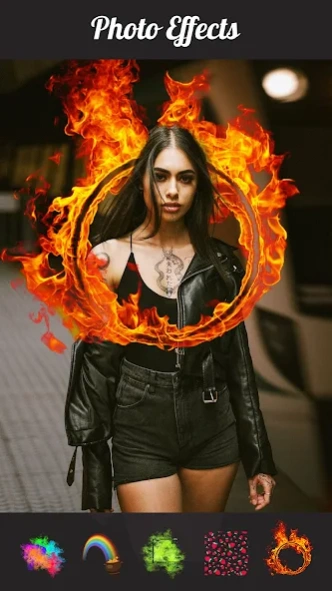


Edit photos like a pro by using vintage photo editor & photo blender, pic crop!
No Crop: Background Changer And Photo Editor – Your All In One Editing Software!No Crop: Background Changer And Photo Editor allows for unique collages and amazing photos. Change your aesthetic with No Crop: Background Changer And Photo Editor effects, trim backgrounds, blend images, and more to achieve everything in one place! With No Crop: Background Changer And Photo Editor, anyone can transform an ordinary image into breath taking art with ease.
Capture photos like never before with powerful tools from No Crop: Background Changer And Photo Editor. Personalize, retouch, and redesign your images with pro-level precision unlike any before.
📄
NoCrop: Pic Collage Maker & Photo Blender Main Features:
📄
✨ Full automation for background remover and powerful background changers;
✨ Advanced editing functions from No Crop: Background Changer And Photo Editor;
✨ Stunning collage maker from NoCrop: Pic Collage Maker & Photo Blender;
✨ Dozens of filters and photo effects with Whitagram: Edit Photos And Change Backgrounds;
✨ Edit every picture using Edit Pictures: Photo Filters and Photo Effects;
✨ Social sharing with one tap square-fit resizing;
✨ Artistic overlays such as: drip, spiral, glitch, neon, sketch and…more;
✨ Smooth double exposure and photo blending tools;
✨ Adjustable quality high-resolution embossing export!
With No Crop: Background Changer And Photo Editor, Edit Like A Pro In Just A Few Simple Taps!
Selfies, portraits and group photos can all be edited with seamless lighting and background changes to ensure your subjects are always the focus of attention. With no extetnal apps required, we've ensured you that professional-level tools are plaved right at your fingers.
Integrate Creativity and Collages By Blending:
🎨
Capture stunning photos with NoCrop: Pic Collage Maker & Photo Blender; you can blend a maximum of fifteen images and arrange them with numerous layout possibilities. Not only does the collage maker allow creating collages, blending photos is also possible for NoCrop: Pic Collage Maker & Photo Blender users. Accomplish your artistic side seamlessly with background blur, shape overlays, and colorful frames. It is totally integrated, so no need to utilize multiple tools!
Eyes Will Be Attributed To Blurs Filters:
🌈
Whitagram: Edit Photos And Change Backgrounds gives you instant access to simple but quality filters and effects. With filters like classic vintage, neon glows, retro duotone, and bokeh magic, you are guaranteed unique moods for your portraits. Your feed’s productivity will remain undisputed and used with Whitagram: Edit Photos And Change Backgrounds, which further enhances visuals and creativity.
Powerful Tools With Focused Details Capabilities:
🛠️
Edit Pictures: Photo Filters And Photo Effects allows to focus on shadows, saturation corrections, and sharpening of images. Moreover, Text and stickers can be added to make your shots more lively; this outrageous app allows users to design and edit pictures with motion and mirror effects. Whatever the case; modifying issues or constructing from scratch, this toolkit aids every need.
Share with Clicks of a Button. Create and Edit Like Never Before!
No Crop: Background Changer And Photo Editor, NoCrop: Pic Collage Maker & Photo Blender and Whitagram: Edit Photos And Change Backgrounds allow you to create visually appealing photos within a few seconds. Whether you’re changing the backgrounds of images or framing your selfies, Edit Pictures: Photo Filters And Photo Effects offers edits suitable for all artistic levels. You can achieve all this and more without breaking a sweat because everything you need is all in one place.
About NoCrop Edit Picture, Whitagram
NoCrop Edit Picture, Whitagram is a free app for Android published in the Screen Capture list of apps, part of Graphic Apps.
The company that develops NoCrop Edit Picture, Whitagram is TarrySoft. The latest version released by its developer is 4.0.0. This app was rated by 9 users of our site and has an average rating of 3.1.
To install NoCrop Edit Picture, Whitagram on your Android device, just click the green Continue To App button above to start the installation process. The app is listed on our website since 2026-08-18 and was downloaded 110 times. We have already checked if the download link is safe, however for your own protection we recommend that you scan the downloaded app with your antivirus. Your antivirus may detect the NoCrop Edit Picture, Whitagram as malware as malware if the download link to com.lyrebirdstudio.nocrop is broken.
The company that develops NoCrop Edit Picture, Whitagram is TarrySoft. The latest version released by its developer is 4.0.0. This app was rated by 9 users of our site and has an average rating of 3.1.
To install NoCrop Edit Picture, Whitagram on your Android device, just click the green Continue To App button above to start the installation process. The app is listed on our website since 2026-08-18 and was downloaded 110 times. We have already checked if the download link is safe, however for your own protection we recommend that you scan the downloaded app with your antivirus. Your antivirus may detect the NoCrop Edit Picture, Whitagram as malware as malware if the download link to com.lyrebirdstudio.nocrop is broken.
How to install NoCrop Edit Picture, Whitagram on your Android device:
- Click on the Continue To App button on our website. This will redirect you to Google Play.
- Once the NoCrop Edit Picture, Whitagram is shown in the Google Play listing of your Android device, you can start its download and installation. Tap on the Install button located below the search bar and to the right of the app icon.
- A pop-up window with the permissions required by NoCrop Edit Picture, Whitagram will be shown. Click on Accept to continue the process.
- NoCrop Edit Picture, Whitagram will be downloaded onto your device, displaying a progress. Once the download completes, the installation will start and you'll get a notification after the installation is finished.
Program Details
System requirements
Operating systems
Android
Download information
File size
N/A
Total downloads
110
Pricing
License model
Free
Price
Version History
Here you can find the changelog of NoCrop Edit Picture, Whitagram since it was posted on our website on 2016-09-17. The latest version is 4.0.0 and it was updated on Soft112 on 18 October, 2026. See below the changes in each version:
version 4.0.0
posted on 2026-08-18
version 1.4.0
posted on 2016-12-05
* Smart sticker position selector.,* New gallery layout.,* Crop tool for collage photos.,* New animal stickers.,* 20 new photo frames.,* 46 new special collage layouts.
